

Think about trying to build a house with nothing but a hammer and a handsaw. Sure, you might get it done eventually, but it’d be a slow, frustrating process filled with costly mistakes. Running a real estate business on a jumble of spreadsheets, sticky notes, and a chaotic inbox is pretty much the same thing.
A Customer Relationship Management (CRM) system is the power tool that brings your entire operation together. It’s way more than a digital address book; it’s a command centre built specifically for the unique, relationship-driven world of real estate. It gives you a single source of truth for every conversation, property detail, and client preference.

Going Beyond a Simple Contact List
At its heart, a real estate CRM is designed to manage relationships—lots of them. Instead of just holding a name and a phone number, it maps out the entire client journey from start to finish.
- Lead Origins: It remembers exactly where every lead came from, whether it was a form on your website, a click from a property portal, or an open-house sign-in sheet.
- Interaction History: Every email, phone call, and text is logged automatically. This gives you a complete conversation history at your fingertips.
- Client Preferences: It keeps track of a buyer's budget, their dream neighbourhoods, and must-have features, so you can offer a truly personalised service.
This level of detail completely changes how you connect with clients. Forget generic follow-ups. Now, you can reference specific conversations and send listings that perfectly match what they're looking for, building trust and showing them you’re actually listening.
Taming the Real Estate Chaos
Let’s be honest—juggling leads, listings, and follow-ups can feel chaotic. Spreadsheets get messy fast, and important details can easily slip through the cracks.
Here’s a quick look at how the old-school methods stack up against a dedicated CRM.
Manual Methods vs Real Estate CRM
| Task | Manual Method (Spreadsheets/Notes) | With Real Estate CRM |
|---|---|---|
| Lead Tracking | Manually entering names and sources. Prone to errors and forgotten leads. | Leads are captured automatically from websites, ads, and portals. Nothing gets lost. |
| Client Communication | Searching through separate email and text apps. Easy to lose track of conversations. | All communication is logged in one place. You see the full history instantly. |
| Following Up | Relying on memory or calendar reminders that get snoozed. Inconsistent at best. | Automated reminders and follow-up sequences ensure no one is forgotten. |
| Property Matching | Manually searching listings and trying to remember who wanted what. Time-consuming. | Automatically matches new listings to buyers' saved criteria. |
| Reporting | A nightmare to compile. Involves manually pulling data from multiple sources. | Generates performance reports in seconds, showing what's working and what's not. |
A CRM doesn't just organise your contacts; it organises your entire workflow, turning potential chaos into a smooth, repeatable process.
It’s no surprise the industry is catching on. The global real estate software market is expected to jump from USD 13.83 billion in 2025 to USD 26.12 billion by 2031, with CRM software leading the charge. This massive growth shows just how vital these platforms are for managing the day-to-day grind of real estate.
To really get it, it helps to understand the difference between a Real Estate CRM vs Property Data Platform. While data platforms give you the "what" (property details), a CRM manages the "who"—the relationships that actually drive your business. It turns raw information into real opportunities, making sure every lead gets the attention it deserves from the first call to closing day.
The Core Features of a High-Performing Real Estate CRM
Picking a CRM for your real estate business isn't like grabbing any old software off the shelf. It needs to be much more than a fancy digital address book. Think of it as the central engine for your entire operation, specifically built for the fast-paced, relationship-driven world of property. A generic system just won't cut it—you'll spend more time fighting the software than closing deals.
The best real estate CRMs are designed by people who get the daily grind of an agent. They anticipate what you need, automate the soul-crushing repetitive tasks, and give you the insights to get contracts signed faster. Without these core features, you’re really just working with a glorified spreadsheet.
Automated Lead Capture and Nurturing
Let's face it, leads come from everywhere—your website, property portals, social media ads, and even the old-school open house sign-in sheet. A solid CRM acts like a magnet, automatically pulling all these contacts into one central place. This instantly kills off manual data entry, which isn't just a time-waster; it's where mistakes happen.
But getting the lead is just step one. The real magic is what happens next. The system should let you build automated follow-up sequences. For instance, a potential buyer fills out a form on your site. The CRM can immediately fire off a welcome email, ping them with a text two days later, and then pop a task in your calendar to call them on day five.
This kind of automation ensures no lead ever falls through the cracks. It’s like having a virtual assistant working 24/7 to warm up prospects, even while you’re out showing properties.
Visual Pipeline Management
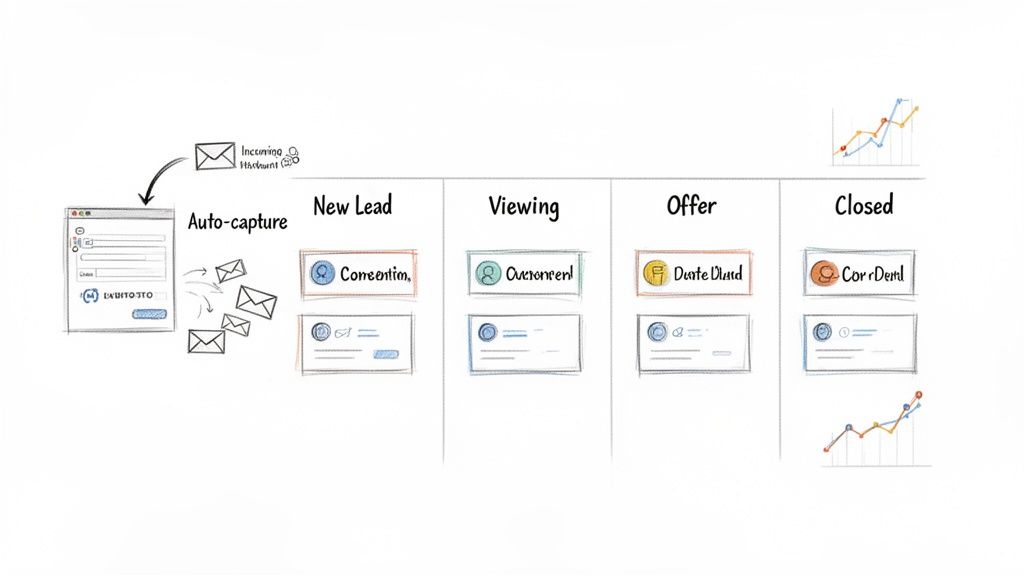
Real estate is a journey. You’re constantly moving clients from that first "hello" to handing over the keys. A visual pipeline, usually in a Kanban-style board, is an absolute non-negotiable feature for tracking this. It gives you a bird's-eye view of every single deal and where it stands.
A typical pipeline might look something like this:
- New Lead: Fresh enquiries that have just landed in your system.
- Contacted: You've reached out via phone, email, or text.
- Viewing Scheduled: They’re booked in to see a property.
- Offer Made: The client has put a formal offer on the table.
- Under Contract: The offer is accepted, and the paperwork is in motion.
- Closed: The deal is done and dusted. Commission time!
This simple drag-and-drop view makes updating deal statuses a breeze. More importantly, it gives you a crystal-clear, real-time snapshot of your sales activity and what your future income looks like.
Key Takeaway: A visual pipeline turns abstract sales targets into a concrete, manageable workflow. It helps you spot bottlenecks in your process and tells you exactly which deals need a nudge to keep everything moving.
Integrated Communication and Marketing Tools
Jumping between your email, phone, and social media apps to chat with clients is a recipe for disaster. It’s inefficient, and it’s way too easy for crucial conversations to get lost in the shuffle. A top-tier real estate CRM brings all your communication channels into one unified inbox.
This means you can send emails, log your calls, and fire off text messages right from a client’s profile. Every single interaction is automatically recorded, creating a complete timeline that anyone on your team can see. Many of the top CRM platforms with integrated email marketing are now becoming all-in-one powerhouses, so you don't have to juggle multiple subscriptions.
Advanced Reporting and Analytics
How do you really know which marketing dollars are paying off? A good CRM answers that question with built-in reports and analytics dashboards. It tracks the vital signs of your business so you can see what's actually working.
You should be able to instantly pull up reports on things like:
- Lead Source Performance: Pinpoint which channels (your website, referrals, social media) are delivering the most valuable leads.
- Sales Conversion Rates: See what percentage of your leads actually turn into closed deals.
- Agent Productivity: Track key activities for each team member—calls made, viewings scheduled, contracts signed.
- Sales Cycle Length: Measure how long it takes, on average, to turn a new lead into a closed sale.
This data-driven approach means you can stop guessing and start making smart decisions. You can double down on your best strategies, fix what’s broken, and forecast your revenue with confidence. Without solid analytics, you're just flying blind.
Making Your Tech Work Together with CRM Integrations
A CRM on its own is a decent way to get organised, but it’s just one bit of the puzzle. The real magic happens when you connect your crm software for real estate industry with all the other tools you rely on every day. Think of your CRM as the central hub of your business; integrations are the spokes connecting it to everything else, letting information flow freely so the whole system works as one.
Without those connections, you’re stuck doing things the hard way. You find a lead on a property portal and manually type their details into your CRM. Then you get an email about a viewing, so you manually add it to your calendar. Then you have to remember to log the follow-up call. Every single step is a chance for a typo or for a valuable lead to be completely forgotten.
An integrated system—what some people call a 'tech stack'—gets rid of all that friction. It creates a smooth, automatic flow of information between your most important apps, making sure your data is always consistent, up-to-date, and right there when you need it.
Building Your Real Estate Tech Stack
When you link your CRM to other platforms, you create a powerful ecosystem where every tool boosts the others. This isn’t just about making life easier; it’s about building a smarter, more responsive business that pretty much runs itself in the background. That frees you up to do what you do best: talking to clients.
Here are a few essential integrations every real estate professional should have:
- Property Portals (e.g., Domain, REA): This one’s a no-brainer. A potential buyer sends an enquiry about a listing, and that information should instantly create a new contact in your CRM, tagged with the right property, with the enquiry logged automatically.
- Email Marketing Platforms (e.g., Mailchimp): This syncs your CRM contacts with your mailing lists. From there, you can send out automated newsletters, market updates, or alerts about new listings to specific groups, like first-home buyers or investors.
- Calendar and Scheduling Apps (e.g., Google Calendar, Calendly): This connection is brilliant. It lets clients book viewings or meetings themselves, and the event pops up in your calendar and their CRM record. No more back-and-forth emails trying to find a time that works.
This screenshot from OnSilent shows how an AI assistant can act as the central hub, plugging calls and messages straight into your business workflows.
The key takeaway here is how seamless the communication becomes. Every single interaction is captured, qualified, and actioned without you having to lift a finger. It basically turns your phone into a fully integrated part of your business toolkit.
Supercharging Your CRM with an AI Assistant
The most powerful integration you can get today is an AI assistant like OnSilent. This goes way beyond just automating data entry; it automates the entire process of engaging with a new lead. It’s like having a 24/7 front desk that intelligently chats with leads and pushes all the important info directly into your CRM.
Let’s walk through a classic scenario to see how it works.
A potential buyer is scrolling through listings at 10 PM and sends an enquiry. Instead of that lead going cold in your inbox overnight, your integrated AI assistant jumps on it instantly.
Here’s what happens next, all on its own:
- Instant Response: The AI immediately texts the buyer back, confirming the property details and asking a few qualifying questions about their budget and when they’re looking to buy.
- Scheduling: It then checks your integrated calendar and offers a few available times for a viewing. The buyer picks a slot, and the appointment is booked automatically.
- CRM Automation: The system then gets to work creating a new contact in your CRM, filling it with the buyer's details, logging the entire conversation, and setting a task for you to confirm the viewing the next day.
This all happens while you’re asleep or having dinner. The lead is captured, qualified, and booked in, with all the data perfectly organised in your CRM. This powerful connection between your tools is the heart of effective real estate workflow automation, stopping leads from falling through the cracks and giving you back countless hours of your time.
How to Choose the Right CRM for Your Role
Not every role in the property world has the same daily grind, so why would you use the same tools? A ‘must-have’ feature for a top-performing sales agent is often just a ‘nice-to-have’ for a meticulous property manager. Choosing the right CRM software for the real estate industry means cutting through the marketing fluff and zeroing in on the features that solve your specific problems.
Let's be real, a one-size-fits-all CRM rarely works out. The trick is to match the software's strengths to what you actually do every day. That way, you're investing in something that genuinely makes your workflow simpler, not more complicated, and you'll see a real return on your investment.
This visual guide can help you map out your tech priorities, whether you're starting with a standalone system or looking to bring AI into the mix.
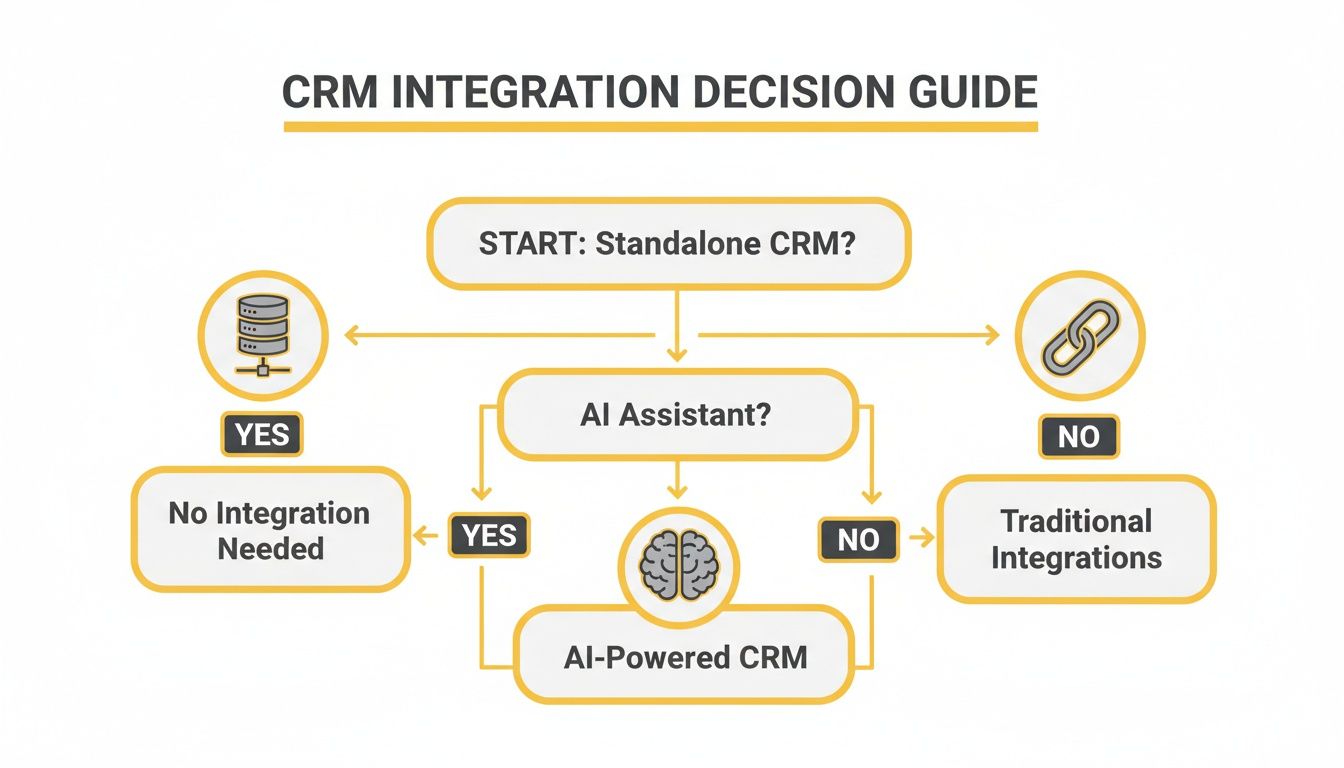
As the flowchart shows, building a powerful tech stack isn't about collecting isolated tools. It’s about creating an integrated system that works together, powered by smart automation.
For the Sales Agent on the Go
Sales agents live and breathe lead nurturing and keeping the pipeline moving. You're rarely at a desk, so your CRM needs to be a proper command centre in your pocket.
Here’s what your checklist should focus on:
- Mobile Accessibility: The app has to be fast and fully functional. You need to be able to update client notes, pull up property details, and manage your pipeline from your phone between viewings. No excuses.
- Sales Pipeline Tracking: A clear, visual pipeline is non-negotiable. With just a glance, you should see exactly where every deal is at, from the initial enquiry right through to the signed contract.
- Lead Nurturing Automation: Look for features that handle the follow-ups for you. A good system will send out timely texts and emails to warm up new leads, freeing you up to focus on the clients who are ready to make a move.
For the Detail-Oriented Property Manager
Property managers juggle a completely different set of plates—tenant relationships, maintenance jobs, and compliance are the name of the game. Your CRM should be the single source of truth for every property and its occupants.
Your must-have features include:
- Tenant Communication Logs: A central inbox that logs every email, text, and call with tenants is essential. It's your best friend for record-keeping and sorting out any disputes down the line.
- Maintenance Request Tracking: The system needs a dead-simple way to log, assign, and track maintenance jobs from start to finish. This keeps both tenants and landlords in the loop without you having to chase everyone.
- Lease Management: You need solid features for tracking lease start and end dates, renewals, and important documents. It's all about staying organised and getting ahead of deadlines.
For the Growth-Focused Broker or Agency Owner
As a broker or owner, you're looking at the bigger picture: team performance, profitability, and strategic growth. Your CRM has to deliver high-level insights into how the entire business is ticking.
Make sure your CRM has:
- Team Performance Dashboards: You need real-time analytics on agent activity, conversion rates, and sales volumes. This helps you spot your top performers and identify where a bit of coaching might be needed.
- Commission Tracking: An integrated system that calculates and tracks commissions automatically will save you countless hours and prevent headaches with payroll.
- Comprehensive Business Analytics: The ability to generate reports on lead sources, marketing ROI, and sales forecasts is vital. This is what allows you to make data-driven decisions that actually grow the agency. You might also find our guide on the best apps for real estate agents useful for boosting team productivity.
The demand for efficiency is loud and clear, with 45% of companies calling automation the top priority they look for in a CRM. This is followed by integration (36%) and mobile access (20%), which really hammers home the need for tools that work together without a hitch.
A Practical Guide to CRM Implementation and Adoption
Choosing the right CRM software for the real estate industry is a massive step forward, but let's be honest, it's only half the job. The real win? Getting your team to actually use it, day in and day out. A smooth rollout and a smart adoption plan are what turn a software subscription into your agency’s biggest advantage.
Think of it less as a tech project and more like moving into a new office. You wouldn't just dump all the furniture in the middle of the room. You’d need a floor plan, a careful moving process, and a way to help everyone find their new spot. Rushing it only leads to chaos and frustration.
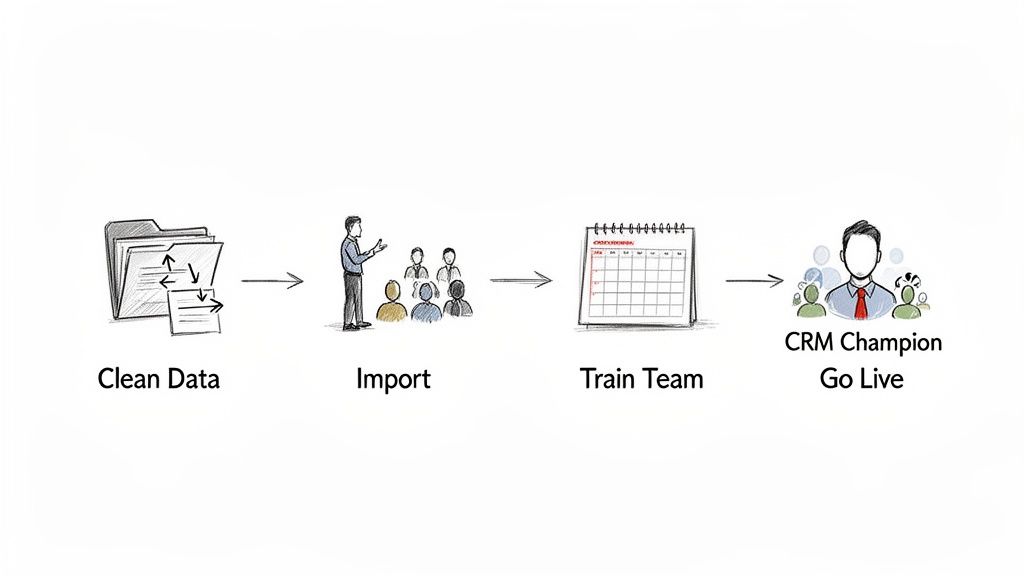
Without a clear game plan, even the world's best CRM will just gather dust. The data doesn't lie: poor user adoption is a top reason CRM projects fail. Getting your team on board from day one isn't just a nice-to-have; it's everything.
Preparing Your Data for the Big Move
Your existing data—all those contacts buried in spreadsheets, inboxes, and old databases—is pure gold. But migrating messy, outdated info into a shiny new CRM is like filling a brand-new filing cabinet with junk. You're just creating a bigger mess for later.
Start with a data cleanup. It’s the single most important thing you can do before you go live.
- Ditch the Duplicates: Get rid of identical contacts to stop confusion in its tracks.
- Update the Details: Correct old phone numbers, wrong email addresses, and stale notes.
- Standardise Your Format: Make sure everything is consistent (e.g., using "+61" for all Aussie phone numbers).
- Archive Old Contacts: Don't clog the new system with people you haven't spoken to in years.
A good clean-up means you start fresh with reliable data, making the CRM instantly useful for the whole team.
Getting Your Team On Board
Technology doesn't change habits—people do. The human side of this shift is where so many agencies get it wrong. To make it stick, you need to manage the change well and get your team genuinely excited about what’s possible.
Key Insight: The goal isn't just to install a CRM. It's to embed it into your agency's DNA. It should be the first tool everyone opens in the morning because it makes their job easier, not harder.
One of the best moves you can make is to appoint a "CRM champion". Find someone on the team who’s keen on tech and loves to help others. They'll be your internal expert, answering questions, sharing tips, and showing everyone how the CRM solves real-world headaches. Their enthusiasm is contagious.
Next, make your training practical and role-specific. A one-size-fits-all demo just won't cut it.
- For Sales Agents: Focus on lead management, tracking their pipeline, and how to use the mobile app on the go.
- For Property Managers: Dive into tenant communication logs and maintenance request workflows. Our guide on improving https://onsilent.com/for-real-estate-agents/property-management-efficiency/ has some great strategies a CRM can power.
- For Admin Staff: Show them how to pull reports and keep the data clean and accurate.
When you tailor the training, you show each person exactly how the CRM helps them in their day-to-day role. It stops being "that new system we have to use" and becomes the indispensable tool that helps close more deals and keep clients happy.
Measuring the ROI of Your Real Estate CRM
Putting your money into a CRM for the real estate industry is a big move. But how do you actually know if it's paying off? Once you get past the flashy features, the real test is the impact it has on your wallet. Figuring out the return on investment (ROI) isn’t a guessing game; it's about connecting the dots between using the software and seeing real, profitable results for your agency.
A good CRM does more than just keep your contacts tidy—it should actively make you more money. By keeping an eye on the right numbers, you can draw a straight line from your monthly subscription fee to more commissions, more productive agents, and a healthier bottom line. That data is all the proof you need to know the investment is working.
Key Performance Indicators to Track
To get a grip on your ROI, you need to zero in on the Key Performance Indicators (KPIs) that show your business is growing. Think of these as the vital signs for your agency's health, and a decent CRM makes tracking them a piece of cake. Forget the vanity metrics; these are the numbers that actually matter.
Your CRM's dashboard is the perfect spot for this. It takes all that raw data and turns it into simple, visual charts, showing you exactly how your team's hard work is turning into sales.
Here are the must-watch KPIs:
- Lead Conversion Rate: This is the big one. It’s the percentage of leads that turn into actual closed deals. If this number is climbing, it's a solid sign your CRM's automated follow-ups and nurturing sequences are doing their job.
- Average Time to Close a Deal: How long does it take to get a client from that first phone call to signing on the dotted line? A CRM should shrink this timeframe by keeping communication smooth and every deal moving forward.
- Client Acquisition Cost (CAC): Work out exactly what it costs you to land a new client. By using CRM data to see which lead sources are goldmines (and which are duds), you can seriously bring this cost down.
- Agent Productivity Metrics: Keep tabs on the number of calls made, viewings scheduled, and emails sent by each agent. This isn't about micromanaging; it's about spotting your top performers and figuring out who might need a bit more support.
A CRM turns vague goals into hard numbers. By tracking these KPIs, you can stop guessing and start making smart, data-driven decisions that directly pump up your revenue and make the software pay for itself.
Linking CRM Usage to Financial Wins
At the end of the day, it's all about connecting your CRM directly to your bank account. You need to show how specific features lead to more cash in the door and happier clients who stick around. For example, you can dive into your CRM database and see how many past clients came back for another deal or sent a valuable referral your way in the last year.
This numbers-first approach is becoming non-negotiable in Australia's cut-throat property market. In fact, Australia's CRM software market ballooned to US$2.5 billion in 2023 and is tipped to hit US$4.4 billion by 2030. What's driving this? The undeniable need for automated systems that can handle everything from lead generation to property management. You can discover more insights about the booming Australian CRM market on Salesmate.io.
By regularly checking these financial metrics inside your CRM, you build an iron-clad case for the tech. You can clearly show everyone—including yourself—that this isn't just another business expense. It's a strategic tool you need for sustainable growth in a very demanding industry.
Got Questions? We've Got Answers
Diving into the world of CRM software can definitely stir up a few questions. From figuring out the budget to worrying about data security, getting straight answers is crucial before you commit to a platform for your agency. Here, we tackle some of the most common queries we hear from real estate pros across Australia.
Getting these details sorted from the get-go means you'll end up with a tool that doesn't just slot into your workflow, but also lines up with your business goals and legal obligations.
How Much Does Real Estate CRM Software Cost?
There's no single price tag on a real estate CRM – the cost can swing pretty wildly. Most platforms run on a subscription model, usually charging a per-user, per-month fee. It's a handy setup that lets the cost grow or shrink right along with your team.
Generally, you'll find pricing broken down into a few tiers:
- Entry-Level: Perfect for solo agents or small teams just starting out. You'll get the core stuff like contact management and a basic sales pipeline.
- Mid-Range: Aimed at agencies on the upswing. These plans usually throw in automation, better reporting, and more options to connect with other tools you use.
- Enterprise: Built for the big players. Think large brokerages needing all the bells and whistles, like dedicated support, top-tier security, and deep customisation.
But when you're comparing, don't just fixate on the monthly fee. You need to think about the total cost of ownership. That includes any sneaky setup fees, costs to get your data moved over, or extra charges for training and support down the track.
Is It a Nightmare to Switch CRMs?
The thought of switching from one CRM to another can feel like a massive headache, but honestly, it's a totally manageable process with a bit of planning. It’s less about a technical nightmare and more about having a smart strategy to make the switch without throwing your daily operations into chaos.
The key is a structured migration plan. It usually involves pulling all your data out of the old system, giving it a good clean-up to ditch duplicates and fix errors, and then importing it into your shiny new platform. Most decent CRM providers have a team ready to hold your hand through these steps.
Expert Tip: Seriously, don't skip the data cleaning stage. Taking the time to organise your contacts and deal history before you move is a game-changer. It means you start fresh with clean, reliable info in your new system and avoid a world of pain later on.
What’s the Deal with Data Privacy and CRMs?
For any real estate agency in Australia, data privacy isn't just a "nice-to-have" – it's a must. The moment you start storing sensitive client info in a CRM, from phone numbers to financial details, you're on the hook to protect it under the Australian Privacy Act.
This makes it absolutely critical to pick a CRM provider that takes security seriously. Look for platforms that offer features like data encryption, secure logins, and the ability to set different permission levels for your team. Always, always read the provider's privacy policy to get a clear picture of how they handle your data. A little due diligence here will protect your clients' trust and keep you on the right side of the law.
Ready to stop missing calls and start closing more deals? OnSilent acts as your 24/7 AI assistant, qualifying leads and booking viewings directly into your CRM while you focus on what matters most. See how it works.