

Forgetting to cancel call forwarding can silently sabotage your business. What starts as a temporary convenience can quickly turn into a source of lost leads and seriously frustrated clients. Thankfully, deactivating it is usually as simple as flicking a switch in your iPhone or Android settings, or dialling a quick carrier code like ##002#.
Why You Must Master Call Forwarding Deactivation
For any busy professional, an unmanaged call forwarding setting isn't just a minor oversight—it's a direct path to lost revenue. It goes from being a handy tool for managing your availability to a hidden weakness in your client communication. By not switching it off, you risk creating a dead end for potential clients who are trying to reach you.
Picture this real-world scenario: a property manager forwards her calls to a colleague for a two-hour afternoon viewing. Simple enough. But she gets caught up and forgets to turn it off. That evening, several serious buyer enquiries roll in. Instead of reaching her, the calls go straight to her colleague's voicemail, who has long since clocked off for the day. The leads go cold. The opportunities vanish.
Protect Your Professional Reputation
This isn't just about one or two missed calls. Consistently failing to cancel call forwarding can do real damage to your professional reputation. When clients can't reliably reach you at your main number, it screams disorganisation and can start to erode their trust. Mastering deactivation is just a fundamental business practice, ensuring you remain the primary, reliable point of contact.
Prevent Costly Lead Leakage
Every single missed call is a potential lost deal. In 2024, Australian businesses grappled with a staggering volume of missed calls, often made worse by accidental call forwarding setups that sent important leads straight to the digital ether.
It's a bigger problem than you might think. Telstra reported that over *500,000 Australian users dialled #21# just to deactivate unconditional call forwarding on their network in 2024 alone. For professionals like property managers, forgetting to cancel forwarding led to them missing out on 25% more buyer enquiries during those crucial evening hours. You can dig into more Australian digital trends and their business impact over at datareportal.com.
The real cost of a forgotten setting isn't just the inconvenience; it's the cumulative loss of opportunities. Regaining control over your phone line means you decide who answers your calls, ensuring every lead is handled with the urgency it deserves. To get a better handle on how it all works, check out our guide on the basics of call forwarding.
Ultimately, knowing how to quickly and reliably cancel call forwarding is an essential skill. It ensures your communication lines are always open, your leads are captured, and your professional image remains intact. It turns your phone back into your most powerful business tool.
How to Cancel Call Forwarding in Your Phone Settings
Ever left call forwarding on by mistake? It’s a classic way to miss out on new client enquiries and lose business before you even know it's happening. The reality is, an active forward can have a direct, and often negative, impact on your communication control.
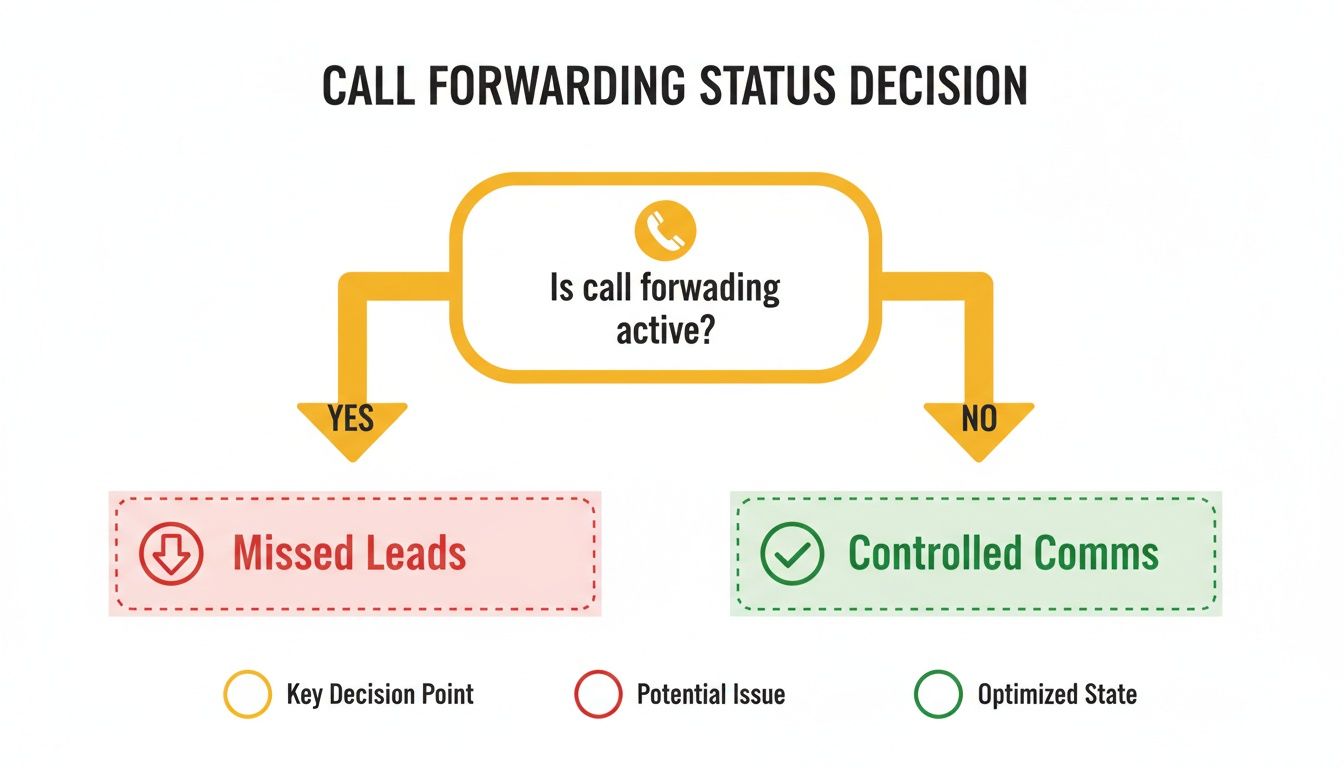
As you can see, leaving call forwarding on is a fast track to missed leads. Taking a moment to switch it off is all it takes to maintain controlled, professional communications. The quickest way to get that control back is usually by diving straight into your phone’s settings.
Before you even think about dialling carrier codes, both iPhone and Android have built-in options to manage call routing. I find this is almost always the most straightforward method, as it gives you a clear visual confirmation that the setting is well and truly off.
Disabling Forwarding on Your iPhone
Apple keeps things pretty logical, tucking the call forwarding setting in an easy-to-find spot within iOS. It’s usually a simple toggle switch you can flip on or off as needed, giving you immediate control over where your calls are heading.
To find it, you just need to tap through a couple of menus:
- Open the Settings app on your iPhone.
- Scroll down and tap on Phone.
- Look for the Call Forwarding option and give it a tap.
- You'll see a single toggle switch. If it's green, tap it to turn it off.
You’ll probably see a little spinning icon for a moment while your phone talks to the network to update the setting. Once it stops and the toggle is grey, all incoming calls will ring directly on your device again. Simple as that.
Pro Tip: If you're running dual SIMs for work and personal lines, make sure you select the correct line at the top of the 'Phone' settings screen before you head into the call forwarding menu. It’s a small step that ensures you’re deactivating it for the right number.
Turning Off Call Forwarding on Android
The process for cancelling call forwarding on an Android phone is just as simple, but the menu names can vary a bit depending on who made your phone. Whether you're using a Samsung, Google Pixel, or another brand, the general path is very similar.
For most Android users, the journey starts right inside the Phone app.
- Google Pixel and Stock Android: Open the Phone app, tap the three-dot menu, and head to Settings > Calls > Call forwarding. You'll see separate options for different conditions (like 'When busy' or 'When unanswered'). Tap each one that's active and select 'Turn off'.
- Samsung Galaxy Devices: On a Samsung, the path is slightly different. Open the Phone app, tap the three-dot menu, then go to Settings > Supplementary services > Call forwarding. From here, you can disable any active forwarding rules.
If you’re having trouble finding the option, just use the search bar in your phone's main Settings app and type "call forwarding". This little shortcut often takes you directly to the right screen, saving you the hassle of hunting through menus. After you've turned it off, it's always a good idea to get a colleague or friend to call you, just to confirm it’s all working as it should.
Using Carrier Codes for Telstra, Optus, and Vodafone
Sometimes, fiddling with the settings on your iPhone or Android just doesn't do the trick. You might find the call forwarding option is greyed out or simply won't respond, which is a real pain when you need to switch it off urgently.
This is where carrier codes, also known as MMI codes, come into their own. They're your direct line to your carrier's network.
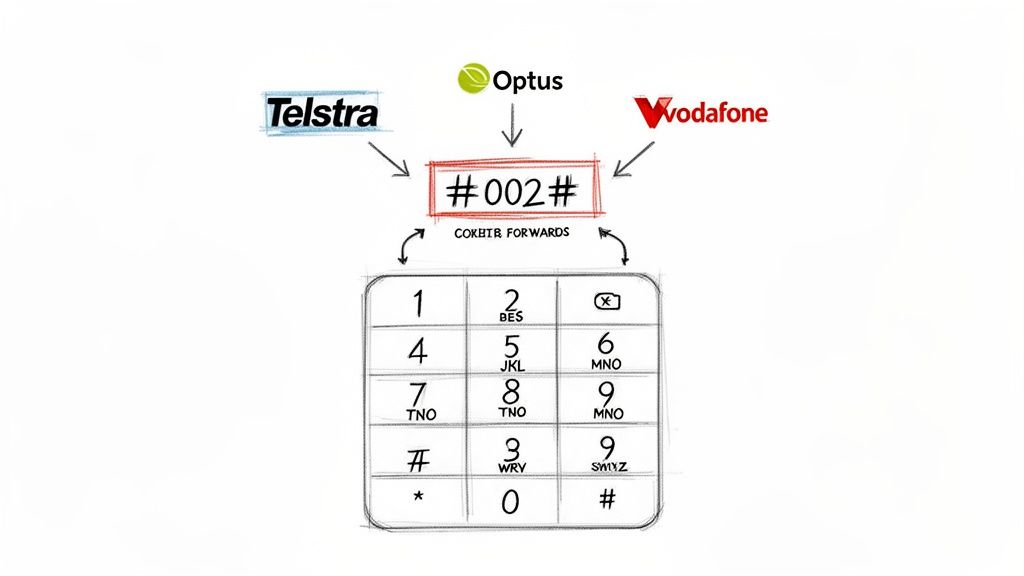
You punch these short codes straight into your phone's keypad to manage settings at a much deeper level than the standard phone menu allows. The good news is that for most of us in Australia on Telstra, Optus, or Vodafone, there's one universal code that acts as a master reset for all diverts.
The most powerful code you can use is ##002#. Dialling this and hitting the call button cancels every single active call forwarding rule on your account. It covers everything—unconditional forwarding (all calls) and all the conditional ones (when you're busy, unanswered, or out of reach).
The Master Deactivation Code for All Carriers
Think of ##002# as the ultimate off-switch. It’s the quickest, cleanest way to make sure your phone is the only thing that rings when someone calls.
- Telstra: This code works like a charm on the Telstra network, wiping all existing diverts clean.
- Optus: If you're with Optus, you can also count on ##002# to clear out any forwarding settings.
- Vodafone: This is the standard deactivation command for Vodafone customers, too.
To use it, just open your phone's dialler, type in ##002#, and press the green call button. A confirmation message should pop up on your screen to let you know it was successful. It's a dead-simple way to take back control.
A common trap people fall into is deactivating just one type of forward, like 'unconditional', while leaving 'conditional' rules active. Using ##002# avoids this mess entirely by wiping the slate clean. No more calls accidentally getting sent to voicemail or another number when your line is busy.
Specific Codes for Conditional Forwarding
While ##002# is a fantastic catch-all, sometimes you only need to disable a specific type of divert. Maybe you want to stop sending calls elsewhere when your line is busy, but keep the rule for when a call goes unanswered. For that, you need more targeted codes.
Thankfully, most Aussie carriers use standardised GSM codes for this level of control. You can get into the nitty-gritty of each call forwarding deactivate code in our detailed guide, but here are the key ones you'll need:
- Cancel When Busy: Punch in ##67#
- Cancel When Unanswered: Dial ##61#
- Cancel When Unreachable: Use ##62#
These codes give you surgical precision over your call routing without having to do a full reset. It’s also smart to keep an eye on how network changes can affect your services. For example, staying informed about major shifts, like Vodafone New Zealand's network updates regarding its 3G shutdown, is important as it could impact how your mobile services behave.
If a code ever fails to work, try toggling Airplane Mode on and then off again. This quick trick resets your phone’s connection to the network and often fixes minor glitches that stop the codes from going through.
Right, you’ve followed the steps, dialled the codes, and your phone is still stubbornly diverting calls. It’s a classic frustration – you hit the deactivation button, only to get a blunt "failed" message or find the setting just flicks itself back on.
Before you resign yourself to a long wait on hold with your carrier's support team, there are a couple of quick tricks worth trying first.
The oldest trick in the book often works a treat: just restart your phone. A full power-off-and-on cycle forces your device to reconnect to the network from scratch. This simple act can clear out minor glitches that were blocking the deactivation command from going through. In the same vein, popping your phone into Airplane Mode for ten seconds and then turning it off again can have a similar network-resetting effect.
Are You Disabling the Right Type of Forwarding?
One of the most common trip-ups I see is a simple mix-up between the two kinds of call forwarding. It’s a small detail, but it’s usually the culprit when deactivation seems to fail.
- Unconditional Forwarding: This is the full-on "send everything away" option. It diverts all your incoming calls to another number without your phone ever ringing.
- Conditional Forwarding: This one is a bit smarter. It only kicks in under specific conditions – like when you’re already on a call, you don’t answer in time, or you’re out of service.
A lot of people manage to turn off their unconditional forwarding, then get confused when some calls still get diverted. That’s usually a lingering conditional rule doing its thing in the background. This is exactly why the universal code ##002# is so handy—it’s a clean sweep that cancels both types, leaving no room for confusion.
It's easy to assume all call forwarding is the same, but those conditional settings are sneaky and often work behind the scenes. If you're still having issues, dive back into your phone's call settings and double-check for any separate rules that might still be active.
When It’s Time to Call Your Carrier
So, you've rebooted, you've tried the codes, and you’ve hunted down every possible setting. If your calls are still being forwarded, the problem is likely on your carrier's end. Sometimes a setting gets "stuck" in their system, and it takes a manual reset from their team to fix it. This is something we've seen happen more often as network tech has changed.
The big shift to VoIP and the NBN in Australia, for example, has made call forwarding a powerful tool but also a source of headaches, leading to a huge spike in cancellation requests. Optus, for instance, logged over 400,000 deactivation code uses in the first half of 2025 alone—that’s an 18% jump from the year before. A lot of that came from professionals who set up forwarding for a job and forgot to turn it off, which led to messy situations like duplicated leads and 40% longer response times.
If you're curious, you can explore more data on Australian telecommunications trends to see the bigger picture. With this level of complexity in modern networks, giving your provider a call is the most logical next step when you’ve exhausted all other options.
Is It Time to Ditch Manual Call Forwarding?
Constantly flipping your call forwarding on and off is a real chore. It's a temporary fix for a much bigger headache. For every call you manage to catch, how many slip through the cracks when you're on a job, stuck in a meeting, or just can't get to the phone? This endless cycle of setting and unsetting diverts is a broken system, and it's all too easy for things to go wrong.
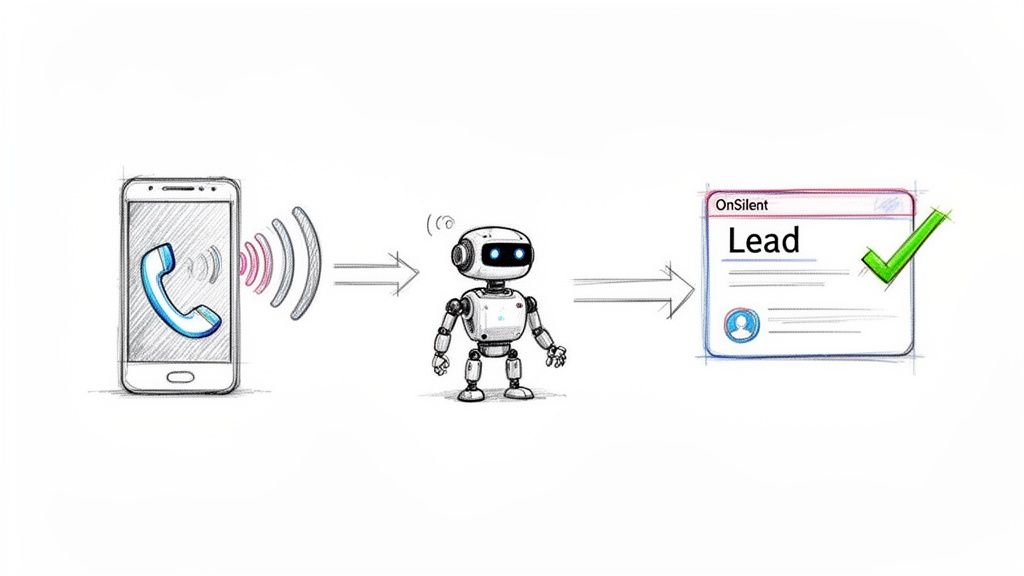
Now, imagine a system that doesn't just manage diverts but actually grabs and follows up on every single lead you miss. That's where a smart assistant like OnSilent comes in. It offers a much smarter way to handle things, working completely separately from your mobile carrier’s clunky forwarding rules to create a solid safety net for your business calls.
The setup is brilliantly simple. OnSilent gives you a dedicated local number. All you do is set your phone to divert missed calls to this number—just once. That's it. You never have to think about cancelling call forwarding again because the system is built to handle exactly that scenario.
How OnSilent Turns Missed Calls into Real Opportunities
When a call goes unanswered and rolls over to your OnSilent number, an AI-powered assistant jumps into action. This isn't your standard voicemail. It’s an interactive tool designed to qualify leads and pull out crucial information, 24/7.
This automated approach fixes the biggest problems that manual forwarding creates:
- No More "Oops, I Forgot": You set it up one time, and it just works in the background. You’ll never have to kick yourself for missing a crucial call because you forgot to turn off a temporary forward.
- Instant Engagement: While you're busy, your AI assistant is already chatting with the potential client, asking the right questions, and making sure they feel looked after.
- Seamless CRM Syncing: The details gathered from the call are automatically pushed into your CRM, creating new leads or updating client files without you lifting a finger.
The fallout from mishandling call forwarding is no small thing. In Australia's cut-throat telecom market, recovering missed calls relies on acting fast. With telecom services revenue tipped to hit $34.7 billion in 2025, simple forwarding mistakes are estimated to slash efficiency by a whopping 25% for professionals in hybrid work setups. Property managers have been hit especially hard, losing up to 18% of qualified buyer enquiries just because of forgotten diverts.
By switching from manually turning things off to automatically capturing leads, you’re not just dodging missed calls—you're actively turning them into qualified, actionable business. It’s a complete game-changer for how you handle your inbound calls.
Putting Automation to Work for You
The real beauty of this system is how straightforward it is. It takes the daily mental load of managing your phone settings off your plate, freeing you up to focus on the work that actually makes you money. Your AI assistant works tirelessly, making sure every single inbound call adds value to your business, whether you pick up or not.
This turns your phone line from a potential liability into a reliable, automated machine for generating leads. If you're ready to leave the manual hassle behind, check out our guide on how to set up OnSilent on your phone and see just how quickly it can slot into your workflow. It's all about getting your time back and ensuring no lead ever gets left behind again.
A Few Common Questions About Call Forwarding
Even after you've tried the codes and poked around in your phone's settings, it's normal to have a few questions lingering. Let's clear up some of the most common ones so you can feel confident you're in full control of your calls.
How Do I Know If Call Forwarding Is Even Active?
Before you dive into deactivating anything, it's smart to check if call forwarding is actually on. You can do this with a quick code right from your keypad.
On just about any mobile, dialling *#21# and hitting the call button will do the trick. A little status message will pop up on your screen, telling you straight away if unconditional call forwarding is on and, if so, exactly where your calls are being sent. It's a simple check that can save you a whole lot of guesswork.
Will Turning Off Call Forwarding Mess Up My Voicemail?
This is a big one, and I get why people worry. But the short answer is: no, it shouldn't.
Your standard voicemail is actually a type of conditional call forwarding that your carrier sets up. It's designed to kick in only when your line is busy or you don't pick up. When you use a deactivation code like ##002#, you're only cancelling the forwarding rules you've set up yourself, not the core network features like voicemail. Your voicemail should keep catching calls just as it always has.
The main thing to remember is that cancelling your personal call forwarding rules just puts things back to the default network settings. Since your voicemail is part of that default setup, it'll stay put, ready to grab any calls you miss.
What's the Difference Between Call Forwarding and Call Waiting?
It's easy to get these two mixed up, but they do completely different jobs. Knowing the difference is key to managing your calls like a pro.
- Call Forwarding literally sends an incoming call away from your phone to another number. If it's on, your phone might not even ring.
- Call Waiting is that little beep you hear when you're already on a call, letting you know someone else is trying to get through. It gives you the option to pop the first call on hold and answer the new one.
So, one sends calls to a different location, while the other helps you juggle multiple calls on the same line. If you've got other tech-related questions that go beyond call management, you might find some answers on our general FAQs page.
Instead of manually managing settings, let OnSilent automatically capture and qualify every missed call. Our AI assistant ensures no lead is ever lost, turning missed opportunities into valuable business. Get started at https://onsilent.com.